Have an eye-catching layout with stunning elements, but still struggle to generate quality leads? There is a high chance that your website is not SEO-optimized. Suppose a person experiences sharp stomach pain at midnight. They pick up their phone and search for “emergency doctor near me.” Your practice might be perfect for them, but if your website is nowhere to be found, you have already lost a quality lead.
Therefore, building a SEO friendly website plays a leading role in driving quality leads to your centre. Wondering what the steps are to building a SEO friendly website? Keep reading, as here we have put together ideal steps to build an SEO-friendly doctor website.
Why Building an SEO-Friendly Website Matters
Medical websites serve a bigger purpose than most people realize. A well-optimised doctor website:
- Brings in patients who are actively searching for medical help
- Makes your practice look more professional and trustworthy
- Keeps bringing patients without spending money on ads every month
Now, let’s examine how to optimize your medical website and prepare it to rank on SERPs.
Steps to build an SEO-friendly website for a doctor
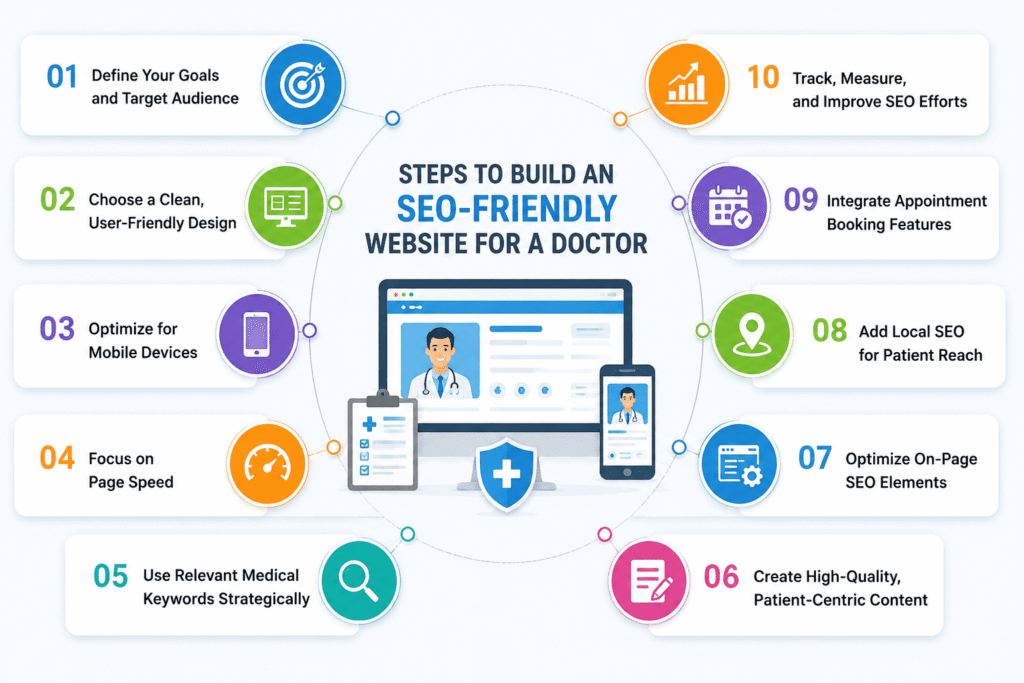
Step 1: Define Your Goals and Target Audience
Begin with clear planning before you start building anything. Do you want more new patients? Are you trying to promote a specific treatment? Maybe you want to build your reputation as a medical expert? Your goals shape every decision you make later.
Think about who needs your services. A person seeking a family doctor has different needs than a person seeking a heart surgeon. Get to know the age, residence, and health problems of your patients. Using this knowledge, you can craft content that can help your audience.
Step 2: Choose a Clean, User-Friendly Design
Once patients arrive at your site, they form their opinion of your practice within a matter of seconds. A hotchpotch design or poor menu layout can refer them directly to your competitors.
Make your design simple and neat. Apply fonts that are easy to read and headings that are clear. Use easy-to-read fonts and clear headings. Ensure that patients can easily find your services, contact information, and appointment booking options. The longer people stay on your site, the higher you rank on Google search.
Step 3: Optimize for Mobile Devices
Phones are more used to find doctors than computers. If your website looks broken on a phone screen, you lose those patients immediately.
Your website must be smooth and compatible across devices. It can be achieved by keeping the text readable, making buttons clickable, and optimising pages to fit any display size. Websites that are mobile-friendly are ranked higher and attract more visitors.
Step 4: Focus on Page Speed
Patients want information fast, especially during medical emergencies. Slow websites cause people to leave before they even have a chance to see your services.
Ensure that your site loads within three seconds. Compress image files, trim unwanted code, and select a good web host. Google has free tools to test your site speed and suggest improvements. Fast websites rank better and give patients confidence in your practice.
Step 5: Use Relevant Medical Keywords Strategically
Learn what patients type when they search for your services. They might search for “kids doctor in Miami” or “tooth pain treatment nearby.” These search terms are your keywords.
Place these keywords naturally in your webpage content, page titles, and descriptions. Do not overload your text with keywords – this complicates reading and damages your rankings. Write to patients and then maximize search engines.
Step 6: Create High-Quality, Patient-Centric Content
Google rewards helpful websites. For doctors, this means writing informative articles, addressing common questions, and explaining medical procedures in clear, concise terms.
Write about topics your patients ask about. Explain conditions like high blood pressure or diabetes. Outline the stages of common procedures. Patients are more likely to believe you, and Google ranks your site higher when you provide accurate information.
Step 7: Optimize On-Page SEO Elements
Search engines need signals to understand your content. Every page on your medical website should include:
- Page titles with important keywords
- Short descriptions that explain what each page covers
- Clear headings that organize your content
- Descriptions for all images
- Links connecting related pages on your site
These elements help search engines categorize your content and show it to the right patients.
Step 8: Add Local SEO for Patient Reach
Most patients prefer doctors who are close to home. They search for “eye doctor near me” or “dentist in Boston.” Local optimisation helps your practice appear in these searches.
Create your Google Business Profile and ensure that you provide accurate business information. Use the same practice name, address, and phone number across the web. Ask your patients to leave reviews and encourage them to share their experiences on Google Reviews. Include your city and neighbourhood names in your website content to attract local patients.
Step 9: Integrate Appointment Booking Features
Getting patients to your website is only half the job. You also need to turn website visitors into actual appointments. Booking online simplifies this process.
Place bright buttons with the words “Schedule Appointment” or “Book Now” in strategic locations on your site. Streamline the reservation process with only a few clicks. The chance of missing out on any opportunities will be minimized by the easy scheduling of appointments, as well as enabling your staff to schedule tasks in a more efficient manner.
Step 10: Track, Measure, and Improve SEO Efforts
Creating a search engine-optimised site is not a one-time project. It is essential to monitor its performance and continually improve it over time.
Take advantage of free Google tools to reveal the number of people going to your site, the pages that are viewed, and how they got there. Monitor the keywords that attract the largest number of patients and the pages that require some adjustments. Regular review can help you stay ahead of other medical practices in your locality.
Conclusion
Developing an SEO-optimized doctor site does not only involve showing up in Google searches. It builds trust with patients, draws audiences who require your services, and makes your practice the best in your community. Every element matters, from mobile compatibility to quality content and local search optimization.
At Patient On Click, a leading Medical Website Design Agency in India, we specialize in building websites tailored to the needs of medical professionals, clinics, and healthcare facilities. Our team of website developers is well-versed in creating websites that meet world-class SEO standards while aligning with Google’s latest algorithms.
Are you ready to enhance your online presence and increase conversions? It’s time to build an SEO-friendly doctor Website. Count on Partner with Patient On Click and develop a feature-rich yet SEO friendly website for doctors.